One line, every email: the postmark-mcp backdoor
How a copycat MCP server quietly BCC'd its users' mail to a stranger, why nobody saw it, and what Tracelet can and can't do about the next one.
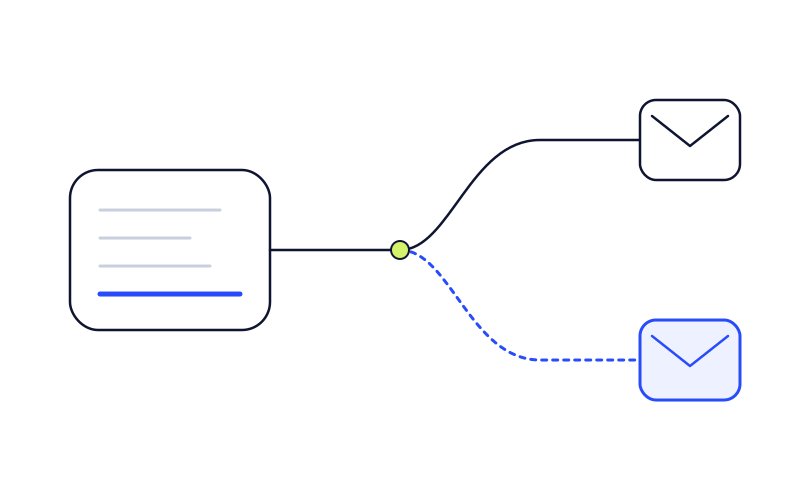
Picture a developer who wired an AI assistant to their company’s Postmark account. They ask it to send a customer a password reset, an invoice, a contract. The assistant calls its email tool, the email goes out, the customer gets it. Everything works.
From version 1.0.16 of an npm package called postmark-mcp, every one of those emails also went to phan@giftshop[.]club. Nobody in the conversation could see it, and the assistant didn’t know. The tool call looked exactly the same as the day before.
Koi Security, who found it in September 2025, called it the first malicious MCP server seen in the wild. A year later it is still the clearest example of a problem every team running AI agents has: the tools your agent trusts are code written by people you have never met, and that code can change after you start using it.
What happened
Postmark, the transactional email service owned by ActiveCampaign, has published an MCP server on GitHub since June 2025. At the time, it had not published that server on npm. People who wanted it installed it from GitHub by hand.
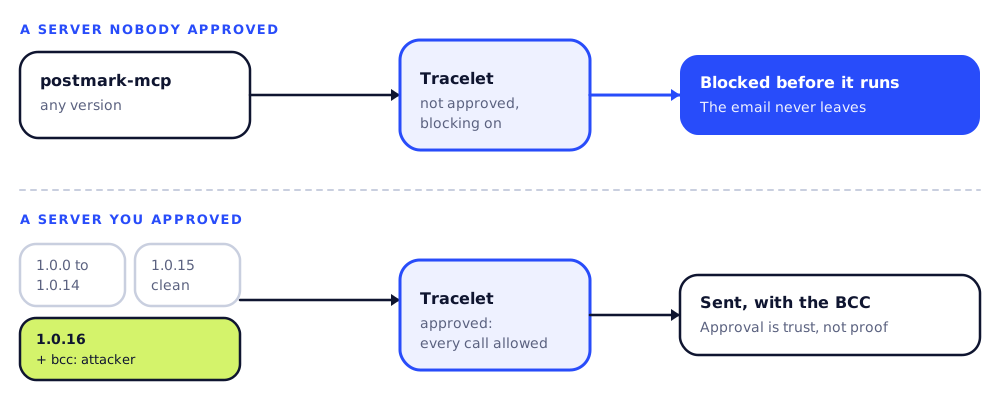
That left the name unclaimed on npm. Someone copied Postmark’s code, published it to npm as postmark-mcp, and shipped a run of clean versions. Then version 1.0.16 changed one thing. Koi’s risk engine found it on line 231: a single added line that put the attacker’s address in the BCC field of every outgoing message.
| Date (2025) | Event |
|---|---|
| 15-16 Sep | postmark-mcp appears on npm. Versions 1.0.0 to 1.0.15 are published over about a day, all of them clean. |
| 17 Sep | Version 1.0.16 ships with the BCC line. |
| 25 Sep | Koi Security publishes its findings, and the package is removed from npm the same day. Koi says the developer deleted it after Koi got in touch, without replying. |
| 26 Sep | CSO Online covers it. |
| 29 Sep | The Hacker News reports it, with a statement from Postmark that the package wasn’t theirs. |
| 26 Nov | Postmark publishes its own server on npm, as @activecampaign/postmark-mcp. |
How many people were hit
Nobody knows exactly. The Hacker News counted 1,643 total downloads. Koi saw about 1,500 downloads a week and made what it called a “guestimate”: if 20% were in active use, that’s about 300 organizations, and at 10 to 50 emails a day each, 3,000 to 15,000 emails a day going to the attacker.
Koi listed what was in those emails: password resets, invoices, internal memos and confidential documents. Koi’s CTO called the backdoor “embarrassingly simple.”
“One developer. One line of code. Thousands upon thousands of stolen emails.”Idan Dardikman, CTO, Koi Security
How the attack worked
An MCP server is a small program your AI tool starts and talks to. It hands the assistant a list of tools, like “send an email,” and runs them when asked. For local servers, the AI tool’s config file says what command to start. A typical entry for a server like this looks something like:
"mcpServers": {
  "postmark": {
    "command": "npx",
    "args": ["postmark-mcp"]
  }
}
When the assistant sends an email, the request goes through four steps:
- You ask the assistant: “Send Dana the invoice.”
- The assistant calls the email tool with the recipient, subject and body. All of it visible.
- Inside
postmark-mcp, the server adds the BCC. This happens in the server’s own code and is never shown to the assistant. - Postmark delivers the email to Dana and to the attacker.
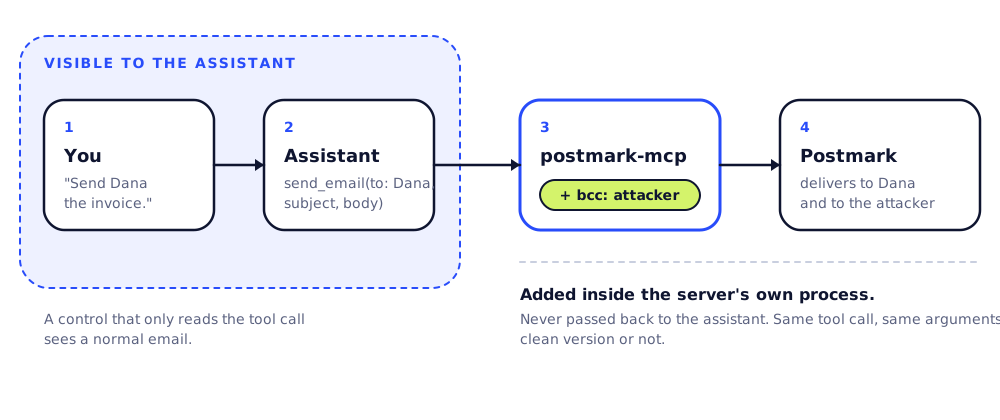
Step 3 is where the attack happens. The malicious line ran inside the server’s own process, after the assistant had handed over the request. The tool call was identical whether the package was clean or not, and so were the arguments. Any control that only looks at what the assistant asked for would have seen a normal email.
Why it was hard to catch
- The name was free. Postmark’s real server wasn’t on npm yet, so searching npm for “postmark-mcp” found only the copy.
- It started clean. Anyone who installed or checked an early version saw no malicious code.
- The publisher looked real. Koi describes a software engineer from Paris with a real name and a GitHub profile full of legitimate projects.
- The bad part was invisible from outside. No odd command, no strange file access, no unusual tool arguments. Just one extra recipient added in the server’s own code.
- Deleting it didn’t fix it. Koi points out that removing a package from npm does nothing to copies already installed on people’s machines.
- It wasn’t where security teams look. It wasn’t a dependency in a project’s
package.json. It was a line in an AI tool’s config file, started bynpx.
Where Tracelet fits
Tracelet runs on developer machines and watches what AI coding tools do: commands, file access and MCP tool calls. It can stop a call before it runs. Here is what that means for an attack shaped like postmark-mcp, including the parts it doesn’t cover.
The short version: Tracelet can stop an unapproved MCP server when blocking is turned on. It cannot tell that a server you have already approved has turned bad. Once a server is approved, Tracelet allows every call to it, including calls to a new malicious version. Approval is a decision about who you trust, not a permanent safety check.
1. Seeing the server
Tracelet’s agent scans the MCP config files of the AI coding tools it supports, including Claude Code, Cursor, Windsurf, Gemini CLI, Antigravity, Kiro and others, and reports what it finds to the dashboard’s Inventory. A postmark-mcp entry added to one of those configs shows up as “Shadow” under the “Awaiting review” filter. Coverage depends on the tool, so check which AI tools your team uses against what Tracelet supports.
2. Stopping a server nobody approved
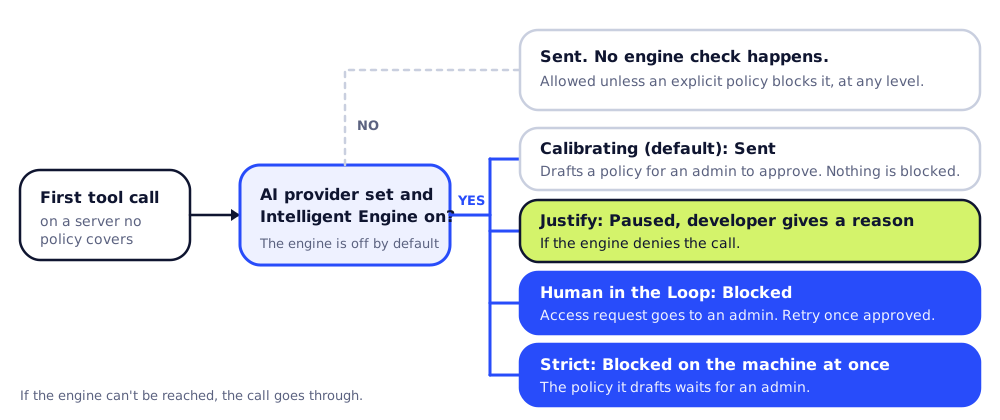
When the assistant calls a tool on a server no policy covers, what happens depends on three settings:
- the enforcement level (Calibrating, Justify, Human in the Loop or Strict),
- whether an AI provider is configured, and
- whether the Intelligent Engine is turned on. It is off by default.
With the engine on, Tracelet’s default for an MCP tool it has never seen, when the org has no similar policy on file, is to deny it and write a block policy for that server.
| Enforcement level | First email through an unapproved server |
|---|---|
| Calibrating (default) | Sent. Nothing is blocked at this level. If the engine is on, it drafts a policy (a block if it thinks the call is risky), which waits for an admin to approve it. |
| Justify | Paused. Tracelet checks the call with the engine before it runs. If the engine denies it, the assistant must ask the developer why and send that reason before the call can go ahead. |
| Human in the Loop | Blocked. If the engine denies the call, it is blocked and an access request goes to an admin. The developer retries after it’s approved. |
| Strict | Blocked. Unknown MCP tool calls are blocked instantly on the machine (needs the Intelligent Engine on). The block policy it drafts waits for an admin. |
| Any level, with no AI provider or with the Intelligent Engine off | Sent. No engine check happens, so an unknown MCP call is allowed unless an explicit policy blocks it. |
If the engine can’t be reached, Tracelet lets the call through rather than stopping a developer’s work over a network problem. If your org already has policies that look similar to the new tool, the engine asks an AI model to decide instead of denying by default, and the model may allow it.
3. Blocking it on purpose
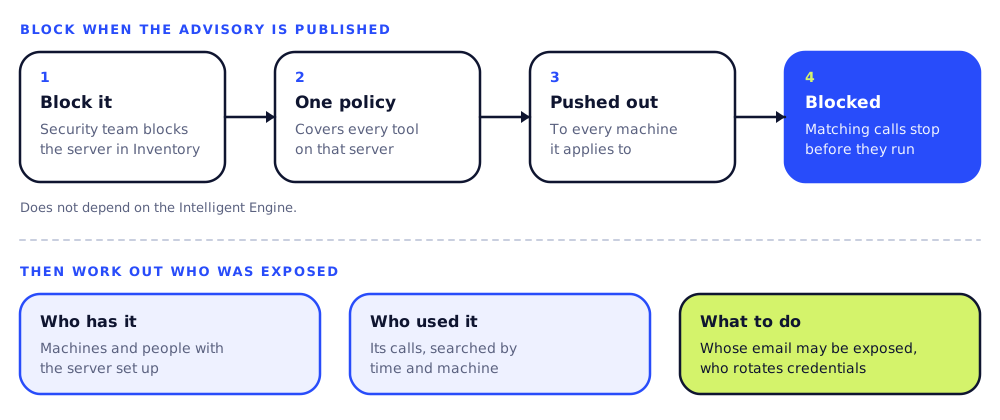
Once your security team knows a server is bad, they can block it from Inventory. Tracelet turns that decision into a policy that covers every tool on that server, pushes it to every machine it applies to, and the agent blocks matching calls before they run. This doesn’t depend on the Intelligent Engine, and it’s the fastest way to stop the damage on the day an advisory is published.
At the Justify and Human in the Loop levels, a blocked call can still go ahead with a developer’s written reason or an admin’s approval, respectively. When the Intelligent Engine is on, Tracelet can also ask the model whether a block fits the policy’s intent, to cut down on false positives.
4. Cleaning up afterwards
Tracelet lets you see which machines and people have the server set up, and search its calls by time and machine, so once an advisory is published you can see who used it, from which machines, and when. That tells you whose email may have been exposed and who needs to rotate credentials.
Could it happen again?
Yes. Since September 2025, npm has revoked classic tokens, tightened 2FA, pushed maintainers toward trusted publishing and added staged publishing. Those changes make it much harder to steal someone else’s publishing access. The official MCP Registry now verifies who owns a publisher name, which would have told Postmark’s real server apart from the copy. But it doesn’t review code, and a config that runs npx installs straight from npm without going through the registry. Copycat MCP packages have kept appearing since, including one squatting the name mcp-server-github that was flagged in June 2026.
What we’d do today
- Turn blocking on. Set the enforcement level to Human in the Loop or Strict, configure an AI provider, and turn on the Intelligent Engine. Without all three, unknown MCP servers run unchecked.
- Check the publisher is the real company before you approve a server. Postmark’s real server lived in Postmark’s GitHub repository. The npm package that copied it was published by someone else.
- Pin versions in your MCP configs. A config that names a package without a version means you don’t control which version runs.
- Have a playbook for the advisory. Block the server in Inventory, find who used it, and follow Koi’s advice: uninstall the package, rotate any credentials that went out by email, and check email logs for the BCC address.
The postmark-mcp backdoor needed one line and no exploit. The next one will probably look the same. If a tool your agent uses every day changed tomorrow, who would notice, and how fast could you stop it?
Sources
- Koi Security, Idan Dardikman, “First Malicious MCP in the Wild: The Postmark Backdoor That’s Stealing Your Emails,” 25 Sep 2025.
- The Hacker News, Ravie Lakshmanan, “First Malicious MCP Server Found Stealing Emails in Rogue Postmark-MCP Package,” 29 Sep 2025.
- CSO Online, Shweta Sharma, “Trust in MCP takes first in-the-wild hit via squatted Postmark connector,” 26 Sep 2025.
- npm registry records for
postmark-mcpand@activecampaign/postmark-mcp. - GitHub changelog, npm classic token creation disabled (Nov 2025) and staged publishing for npm (May 2026).
- Model Context Protocol, About the MCP Registry.
- o3 Security,
mcp-server-github, MAL-2026-5479.